

Layer Controls
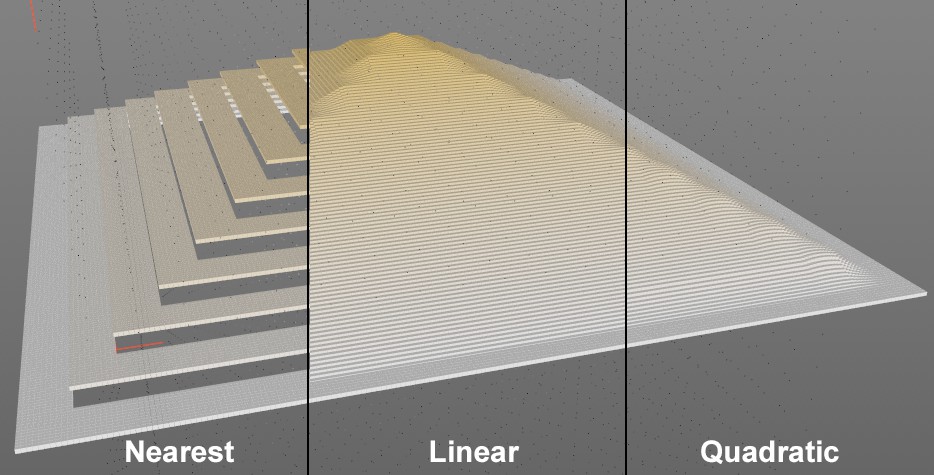 The small black dots are the voxels (with increasing value distribution from the outside to the inside), whose values are read out by a Volume Object Field Layer for the much closer clone positions and determined separately for each clone.
Fields must calculate values for certain positions (clones, object points, etc.). In the rarest of cases, clones/object points are congruent with the voxels. Nevertheless, values must be transferred between the two functionalities. You can select from the following options:
- Next: the value of the closest voxel is used. This can lead to a stepped distribution of values.
- Linear: the neighboring voxel values are determined and averaged linearly as a function of the distance.
- Quadratic: the neighboring voxel values are determined and averaged quadratically depending on the distance. This achieves the most harmonious transmission of values.
This function is often required for spaces that have an inside and an outside. This is entirely logical for the shape Fields (e.g., Spherical Field) but less obvious for particle, spline and volume objects, etc. Volume objects often have settings such as radius, with which a space can also be placed around a point or they define the space themselves. There is always an inside and an outside. This function defines how the inside should be treated. If nothing should happen (option enabled) or should null values, for example, be applied (option disabled), which will hide Fields below it if Blending Mode is set to Normal.
If you place a Volume Loader or a Volume Set in the field list above, these can each contain several volume objects (each linked to a *.vdb file) or volume grids.
These Volume Meshes can be switched on and off individually here. This is useful because, for example, when using Pyro, you can define exactly whether the temperature or the density should be used for the field effect.