

Inputs
This signal is helpful when linking different Nodes that should be hierarchically dependent on each other and can be used here to implement nested loops (see following image).
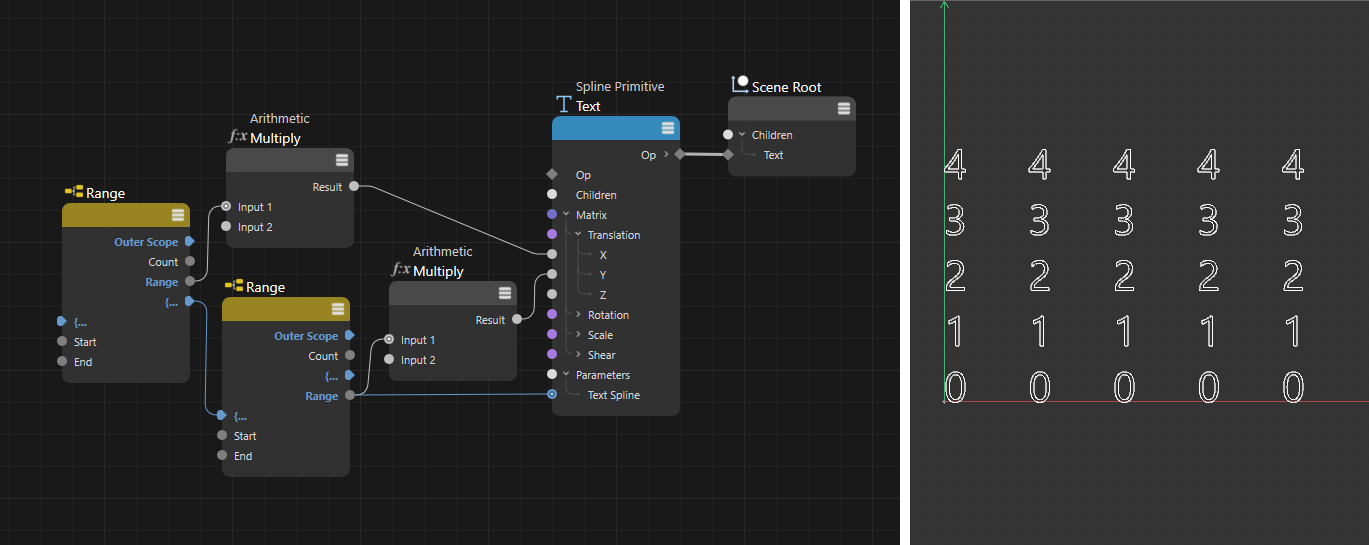
Here, two Area Nodes were linked via the (...) ports. As a result, the first Range Node will first eject its first value (in this case 0) and then the second Range Node will process its entire value range. The focus will then jump back to the first Range Node, which will now output the second number of its value range and so on.
In the example above, the values between 0 and 4 (start=0, end=5) output by the second Area Node will first be created from bottom to top in the left-hand column. The start position along the X-axis will then be incremented by the first Range Node and the second Range Node will ouptut the values between 0 and 4 again.
Start[-2147483648..2147483647]
Use these values to define the range of numbers that you want to output at the range output in succession. Please note that the End value itself will no longer be part of the output Range, so the largest output will always be end-1. The input of 0 for Start and 5 for End therefore will result in the output of the values 0, 1, 2, 3, 4 at the Range output(see also the example above)