
Simple XRef
This page documents the Simple XRef object in Cinema 4D. It references external scene files inside a master scene — assets stay in their own files, teams work in parallel, and updates to the source flow into every scene that uses it.

Cinema 4D now has the XRef object (new XRef system) and Simple XRef (the old XRef system).
When should which XRef system be used?
The old XRef system works best with static scenes (e.g., buildings and background objects) and references to external formats. For example, if you use XRef to directly reference an obj file, it will be opened without question by the master file, while the current XRefs will open an import dialog window for each referenced external format. The old system will also load and process faster but cannot, for example, handle Sketch and Toon Materials. What the old system also does better: re-timing animations via Project Time.
Note that development has been discontinued on the old XRef system.
The new XRef system also imports everything without question and can handle references and animated objects. If you want to include a character animation via XRef, you should always use the new system (which is also easier to use with its XRef options and the XRef Manager).
All commands and managers that are located under (of course, with the exception of , Simple XRef are designed to work with the current, new XRef system.
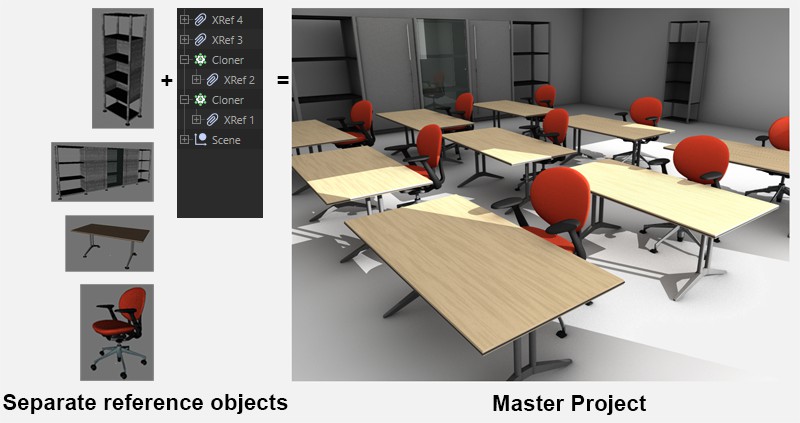 XRef Objects combine separate scenes to form a single master scene.
The XRef function can be viewed as a type of instance function that works over multiple scenes: Individual Cinema 4D reference scenes can be combined into a master scene and rendered there as if all objects were part of the master scene, including materials.
So what is this good for?
Let's say you are working with a very large scene that contains several complex objects. One person is responsible for placing or animating the objects and others would are creating the final models. Objects that are part of individual reference scenes can be added to the master file via XRef which lets the master scene be updated quickly and easily without having to go through a laborious merge process for each scene.
The position, scale and rotation of objects from the reference scenes will be assumed exactly when placed into the master scene. Once an object has been placed into the master scene it can be animated just like any other object. The referenced objects will behave as if they were an actual child object of the XRef object.
The XRef Object's origin will be positioned at the origin of the reference scene's first object.
XRefs objects can be hidden using the Make Editable or Current State to Object commands. The objects from the reference scene will be grouped into Null Objects in the master scene and the materials will be assumed.
XRef objects behave the same as normal objects and can also be animated in the normal fashion.
For example, XRef objects can:
- be deformed using Deformer objects (Bend, Shear, etc.)
- be affected by generators (HyperNURBS, Cloner Objects, etc.). Whereby the XRef functionality is primarily designed to bring separate scenes together to a single scene. More complicated operations should be done in the reference scene prior to placing the object(s) into the master scene.
- have materials assigned to them.
If a reference scene that contains Scene Objects such as Floor, Environment, Background, etc., is XRefed to a master scene, the master scene will only use the first such XRef object and disregard the rest. However, it is possible to access these scene objects using a Stage Object in the master scene (see next paragraph).
You can use the XRef O tab in the object list to access objects in the master scene that are part of a reference scene (i.e. if an Align tag points to a referenced object or if a referenced object's position should be read out or set via XPresso). See also XRef O tab.
reference scenes are not aware of the master scene. A reference scene's Expressions and tags only function within the respective reference scene.
Example:
The Look at Camera Expression will work in the reference scene but not in a master scene into which it has been placed via XRef since the Expression will not recognize the camera in the master scene.
Directory Structure
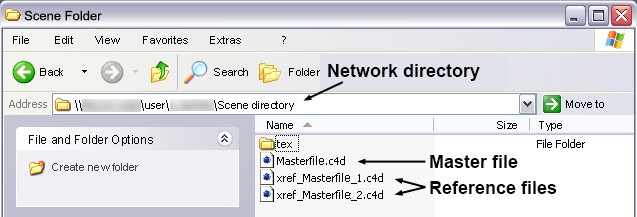 Optimal XRef directory structure.
XRefs work best when the master scene is located in the same directory as the reference scenes. This avoids problems (e.g., with textures) with linked files. This directory can be made available for access to the reference scene(s) across a network.
Note that executing the Save Project with Assets command in the master scene will also save all objects referenced via XRef. They will be saved on the same layer as the master scene itself.
Known Limitations
- No layer assignments will be passed on to the reference scenes when objects or materials are sourced out using the Convert Object Selection To XRef or Convert Material Selection To XRef, respectively.
- Referenced particle systems will only function on a limited basis.
- When using videos (or image sequences) for textures the first image will be displayed as image / frame 1, regardless of the setting (e.g., even if set to frame 20).