

Options
Increasing iterations will shorten edges remove edges accordingly.
If you increase the strength further and further, paradoxical effects can occur in which curves overshoot and increase in length.
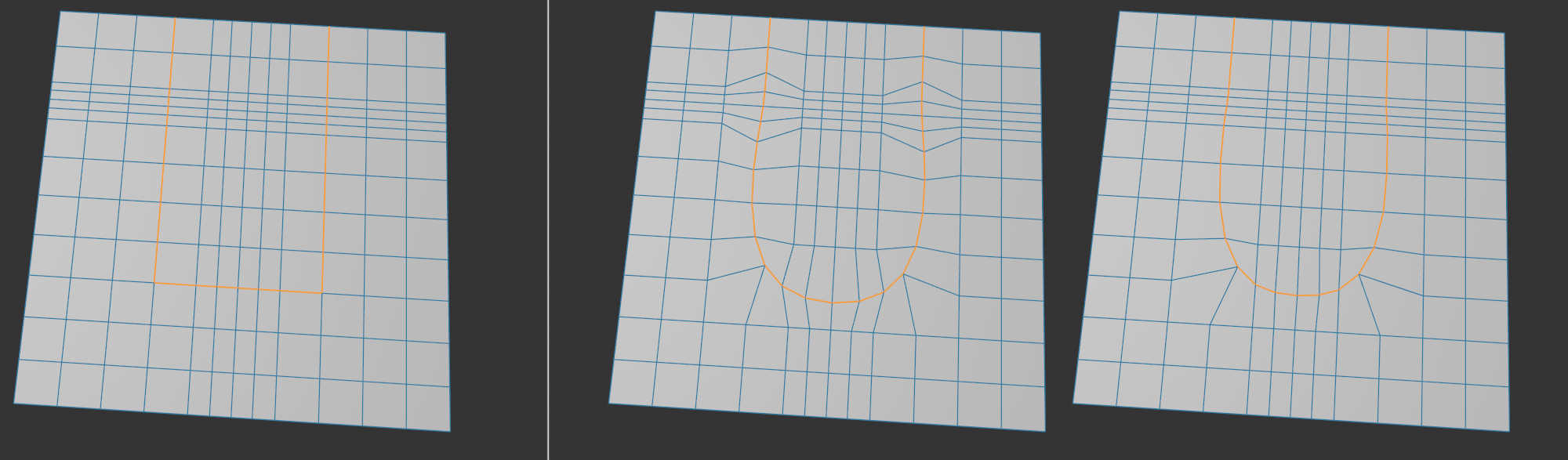 From left to right: Initial position with selected edge band, without and with the Keep Distance option activated.
Use the activated option to decide whether the point spacing of the selected edge should remain as unchanged as possible on areas that are already straight. You can see the effect in the illustration above, where previously parallel edge lines fan out when the option is deactivated (center), which is rarely desirable. On the right, these remain virtually unchanged.
If you work in Polygon mode and then switch to Edge mode, this option decides whether the selection outline should be selected in Edge mode.