

Object Properties
Here you define how strong this gravitational force should be. This value can also become negative, which will have a repulsion effect. Different magnetic poles can be simulated, for example.
You can define a speed limit here to prevent the particles from reaching arbitrarily high speeds and shooting wildly through the image when they come very close.
You can use this parameter to define a radius around the origin of the attractor in which no force acts. Especially in Inverse Square Distance mode, the force near the origin becomes so large that simulations have difficulty dealing with it and "explosive" behavior occurs - as can be seen in the upper half of the video below: Particles are randomly shot into the room. This can be effectively prevented with Minimum Distance.
In the following example, 2 attractors act on particles: In the upper half, Minimum distance = 0, in the lower half 100.
As only moderate forces act in the second case, the particle movement is very harmonious and predictable, with no major outliers.
Normally, the radially symmetrical force of the attractor object decreases inversely proportional to the square origin distance - Inverse Squared Distance option. This means that if an object is twice as far away from the origin of the attractor, the force is four times lower (you are already familiar with such laws of decrease from a light source: the light intensity is also four times lower at twice the distance).
Conversely, this means that if you get close to the origin, the forces at work become very, very large. This is, for example, bad for the calculation of simulations because they cannot handle such large values. Other falloff functions have therefore been provided.
In the video, you will see the 3 decrease options described below: Inverse Square Distance, Inverse Distance and Constant. Rigid Bodies fall past the attractor objects marked with arrows.
Inverse Squared Distance
This is the behavior known from older Cinema 4D versions (see above), which is also physically correct. For example, the gravitational field of the earth or a black hole behaves in exactly the same way.
The rule is: Twice the distance = four times less force.
Inverse Distance
This decrease is inversely proportional to the distance from the origin of the attractor. As you can see in the image above, this Decrease function is similar to Inverse Squared Distance.
The following applies: double the distance = half the force
Constant
The force is independent of the distance from the center of the attractor.
The following applies: Double the distance = constant force
This mode is particularly suitable as a tracking mode, as even very distant objects/particles experience a constantly high force and no "explosive" path changes are to be expected even when the attractor object is very close.
In the following example, many Rigid Bodies (with gravity = 0) follow a moving attractor object and are recorded by a tracer (= spline):
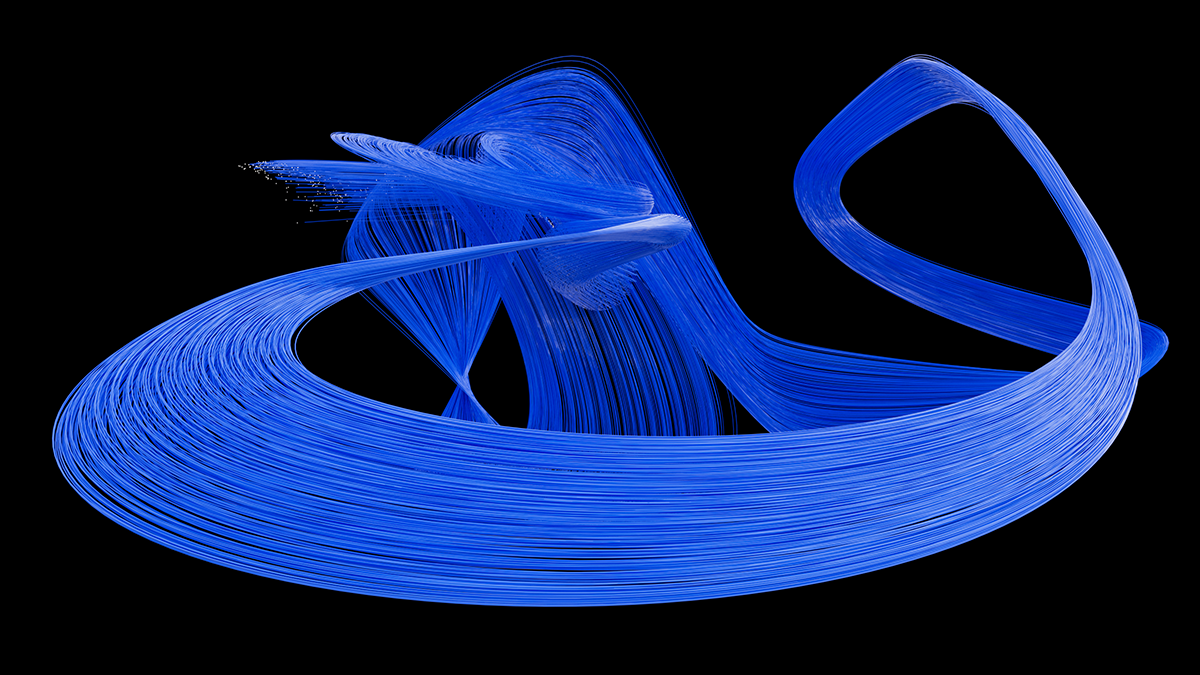 These relatively parallel splines are a result of the Constant option.

Here you can define how a Force Objects should affect dynamic objects (these settings have no effect on particles):
- Acceleration: The modifier twirls the objects around without taking their mass into consideration. Even ,heavy’ objects will behave like feathers.
- Force: This mode takes the objects’ mass into account, i.e., the ,heavier’ an object is the less it can be affected by the modifier.
- Aerodynamic Wind: This mode will actually create a flow of air (current) that will cause the objects to react according to their aerodynamic shape. This mode is not available for all modifiers - only for those for which it serves a useful purpose (e.g., Wind, Turbulence, etc.).
Note that when using the Aerodynamic Wind option, its effect will differ depending on the object over which it flows:
- Rigid Bodies: The wind will be calculated at the center of the Rigid Body and remain constant across the entire object surface.
- Soft Bodies: The wind (strength and direction) will be calculated per polygon or vertex and will affect the object accordingly.