
Materials
You can find more information about exporting materials here.
Enable this option if you want to export textures (videos and image sequences are not supported). glTF only recognizes UVW projection. If you use a different projection within Cinema 4D you will have to fixate this with a UVW tag. The textures can be scaled using the following settings.
Shaders are not supported. These must be baked.
Here you can enter the dimensions of the textures to be exported in pixels.
Here you can define what should happen to existing texture resolutions during export. For example, when exporting, you can define that all textures should have a maximum of 3000 pixels Resize Textures Don't Enlarge; Width/Height 3000).
- Off: Regardless of what is defined for Width/Height, the textures will remain unchanged.
- Don't Enlarge: Textures will only be reduced according to Width/Height, but not enlarged.
- Always (Legacy): Textures will always be scaled to the dimensions defined in Width/Height. This corresponds to the export behavior of older Cinema 4D versions.
If there are no textures and shaders are baked, this selection menu has no function, the baked shaders always have the size defined under Width/Height.
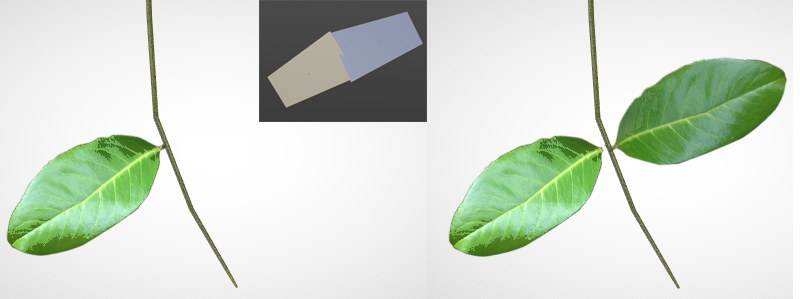 Depending on the orientation of the polygons (option disabled), these will either be visible or not (these are textures masked by an alpha channel).
Use this option to enable or disable backface culling. If this option is disabled, polygons facing away from the camera - the polygon Normals are the key - will not be displayed. Otherwise they will always be visible.