Stop Tag
This page covers the Stop tag in Cinema 4D. It exempts an object from generators or deformers higher in the hierarchy — for example excluding one child from a Subdivision Surface — and can also stop material propagation.
This allows you to stop the effect of generators and deformers that are hierarchically above the current object. To do this, the Stop Tag must be assigned to the object to be deformed and the Stop Deformers option must be activated.
Suppose you have several objects that are hierarchically nested within each other and you throw the entire hierarchy group into a Subdivision Surface object. Without the Stop Tag, the Subdivision Surface affects the entire hierarchy. If you now assign the Stop Tag to an object within the hierarchy, this object and all objects below it in the hierarchy are excluded from the effect of the Subdivision Surface object.
The following applies to deformers: If there are hierarchically underlying objects that are themselves deformed by their own deformers, these objects must also be assigned Stop Tags(Stop Deformers activated) in order to deactivate the deformers.
Example
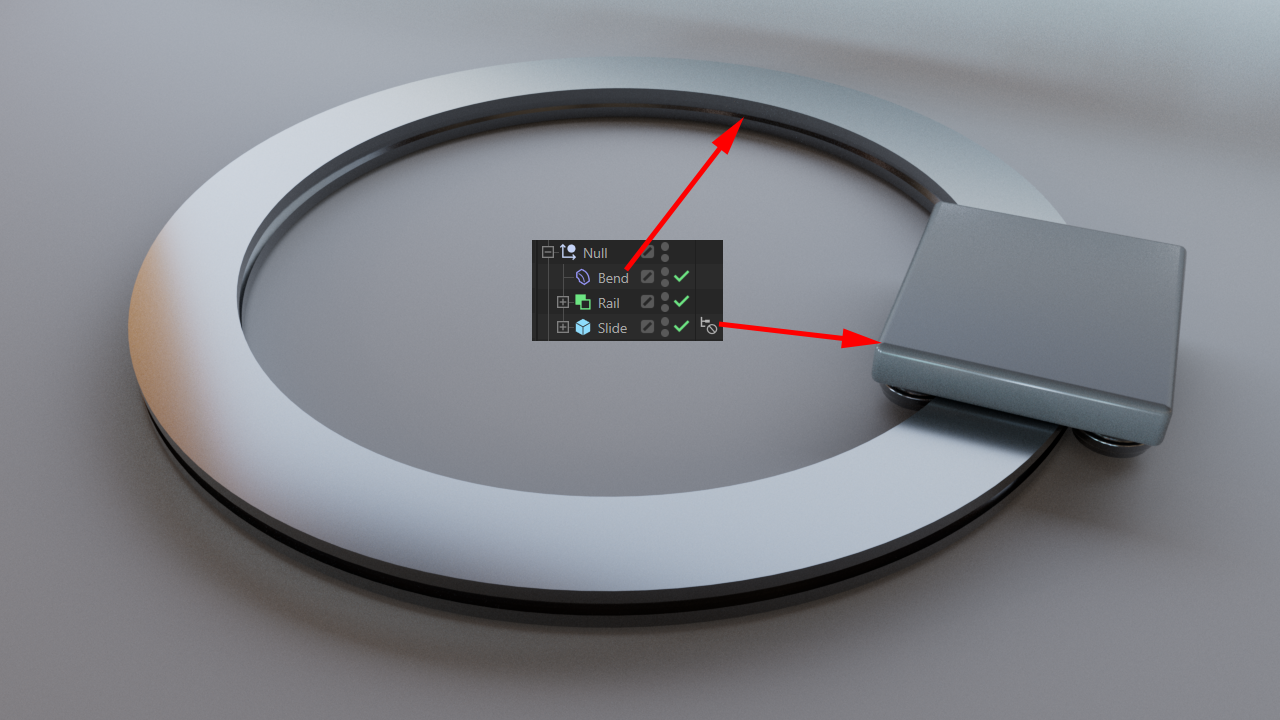
In the following scene, the Bend deformer normally affects all objects in the same hierarchy. This is of course desirable in the case of the rail, but would be fatal in relation to the carriage. This is why the sled has a Stop tag that overrides the deformation for it.