

Position Constraint
This page describes the Position Constraint tag for motion tracking in Cinema 4D. It pins the world origin to a chosen track feature, positioning the whole reconstruction — typically the first calibration step after solving.
The Position Constraint binds the world origin, for example, to a specific feature (this will be the Object Tracker's origin if the Object Tracker is used) - the vertex cluster will be positioned accordingly.
Use the tag as follows to calibrate (2 methods):
-
Create the tag for the respective Motion Tracker or Object Tracker object. A small orange circle will be displayed at the center of the Viewport (always visible when the tag is active). Drag this circle onto the desired Track or feature:
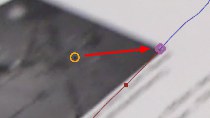
The Motion Tracker links the associated Null object in the tag and uses it to define the world origin, for example, by moving the vertex cluster, including the camera, accordingly. - Select the Create Position Constraint command (main menu: and click on the desired Track. A Position Constraint tag with a linked Null object that matches the Track will be created automatically.
Here you will find an example scene with an assigned tag.

This command creates a Position Constraint tag with a matching linked feature (see previous paragraph).