

Layer Controls
Define the shape of the Curve using this graph.
This and the following settings are difficult to describe. They're easier to learn if you experiment with them. Offset offers an additional temporal offset. This can, for example, be used for fine-tuning.
Imagine the curve in the Shape graph as being offset over the animation time from left (negative values) to right (positive values). This happens if the Animation Speed is set not equal to 0. The larger the value the slower the animation and vice-versa.
In conjunction with the following two settings, looping effects, for example, can be created.
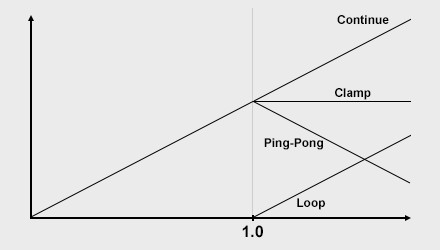 The After Curve options.
What should the curve look like for an animation beyond the shape (separately definable prior to and after) shown above? This can be defined here. You can select from the following options:
- Clamp: The curve will continue with a constant value.
- Continue: The curve will continue with a constant slope.
- Curve: An attempt will be made to predict how the curve will continue with changing tangents before the curve ends. This can result in effects accelerating.
- Loop: If the curve continues past the right of the graph window, it will be continued from the left with the same trajectory. The animation will repeat infinitely.
- Ping-Pong: The Animation will ping-pong back-and-forth.