
Select Connected UV
This command can only be accessed in Edges or Points mode.
Disconnecting UV polygons or using Seams can create separate islands of UV elements and openings in the UV unwrap that may not actually exist on the object’s geometry. In such cases, points and edges that are actually part of a continuous surface may appear multiple times in the UV Editor. The Select Connected UV function makes it easier in such cases to map duplicate points and edges, thereby clarifying which UV areas belong together.
As shown on the left side of the following figure, several edges were first selected at an opening where the separate UV polygons of an ear are located. After executing the command, the corresponding edges on the ear’s separate UV island are also selected (see right side of that figure).
A similar display function can be activated using Highlight Selected Components in the Display menu of the UV Editor. This highlights the vertices or edges corresponding to a selection.
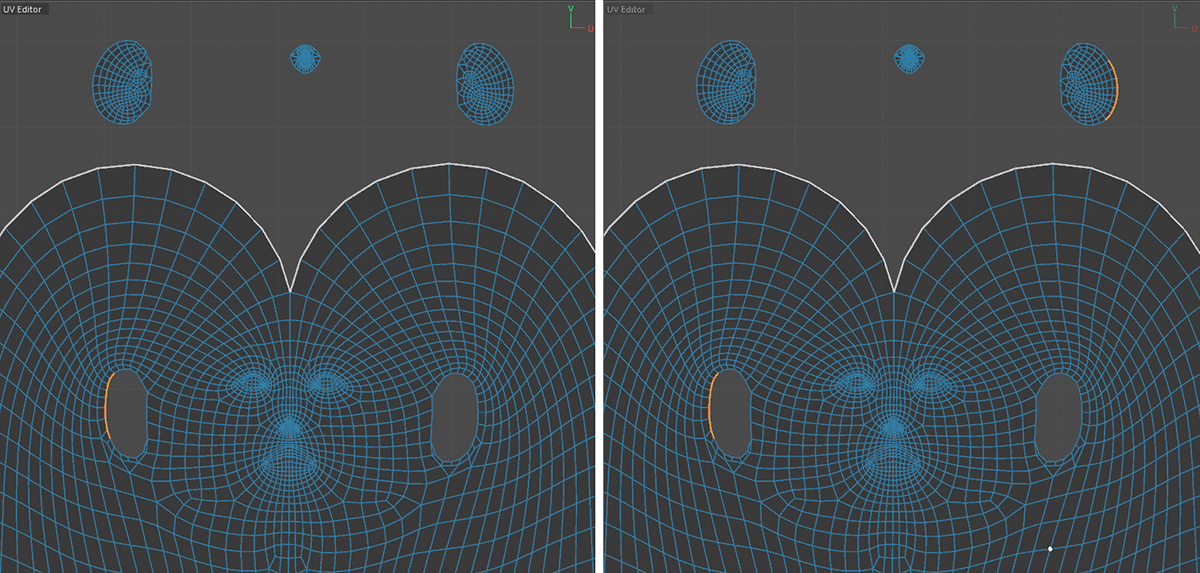 On the left, you can see the manually created selection of some edges along a UV opening. On the right, after executing the command, you can see the additional edges selected along the UV island of the ear polygons that would normally lie within the opening.