
Spline to Position Track

This converts a spline into an animation path. First, select the object whose animation path you want to change. Next, activate the Spline to Position Track command. Based on the first Spline selected in the Object Manager, Cinema 4D will create new X, Y and Z position tracks for the object so that it follows the path of the spline.
Make sure you are not in Link TL/OM Selection mode. Otherwise it will not be possible to select objects and splines separately.
If you are using a B-Spline, you may need to increase the number of intermediate points to ensure a good match between the spline and position track since it can occur that the B-Splines’ control points do not lie on the curve.
Generally speaking, the Bezier splines work best (F-Curves are also Bezier splines by the way)
Generally speaking, the Bezier splines work best (F-Curves are also Bezier splines by the way)
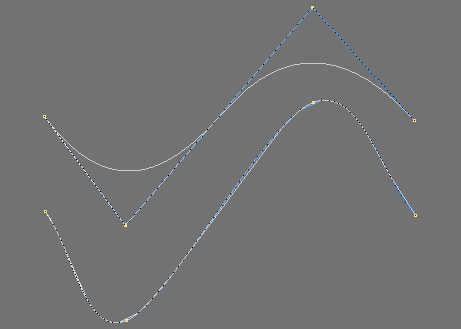 Top: The B-Spline position track, Bottom: A Bezier-Spline position track.