

Join Spline
This page covers the Join Spline generator, a node-based asset capsule in Cinema 4D. It merges multiple spline geometries into one connected spline, for example to turn the output of an Array or MoGraph Cloner into a single continuous path for sweeps, wires or motion trails.
This Node capsule evaluates several assigned spline geometries and combines them into a single, connected spline geometry. This function can be used both in the Node Editor and directly in the Object Manager, where the splines to be connected can simply be grouped under the capsule.
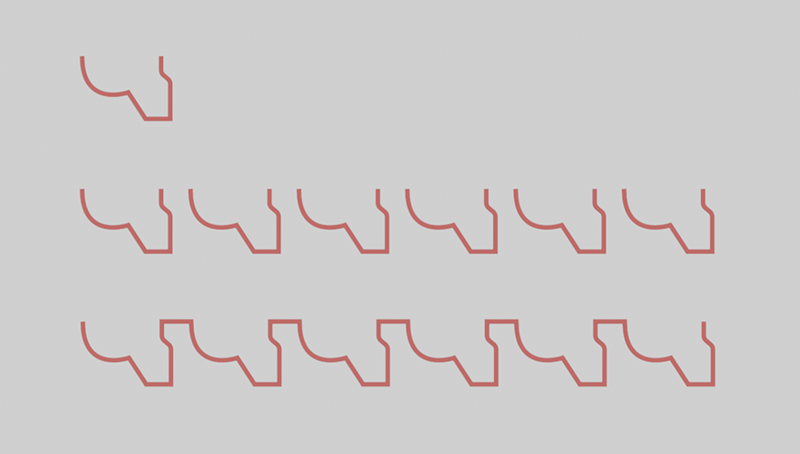 At the top you can see the spline, which was then cloned linearly (shown in the center). Finally, the Join Spline capsule ensures that all spline copies are joined together to form a continuous spline (bottom of illustration).
Both separate splines and splines containing several segments can be assigned. The latter also makes it possible to process an Array Object or a MoGraph Cloner Object, for example, through which spline copies are generated. If these generators are grouped to a Connect Object, splines with several segments are created, which can be resolved and joined together again in the Join Spline capsule. All you need to do is activate the Explode Segments option.
The following figure shows the example in the figure above with a view to the arrangement of the objects in the Object Manager.
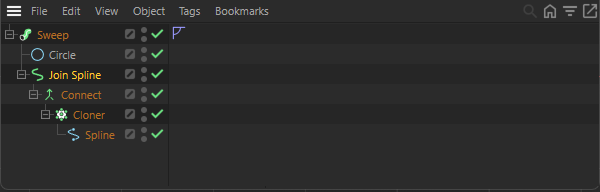 A possible object arrangement for using connected splines with a Sweep object.