

Fracture Tag
Polygon Objects
When working with polygon objects, the distribution of points can be defined using the following settings:
Points will be created as follows:
- Vertices: On each object point
- Edge Centers: At the center of each edge
- Polygon Centers: At the center of each polygon
- Surface: Randomly on polygon surfaces
- Volume: Randomly within the volume of a polygon object (which must not be closed)
Note that if a copy of the object to be fractured is used in Vertices mode, an effect also known as ,dual graph’ effect will occur:
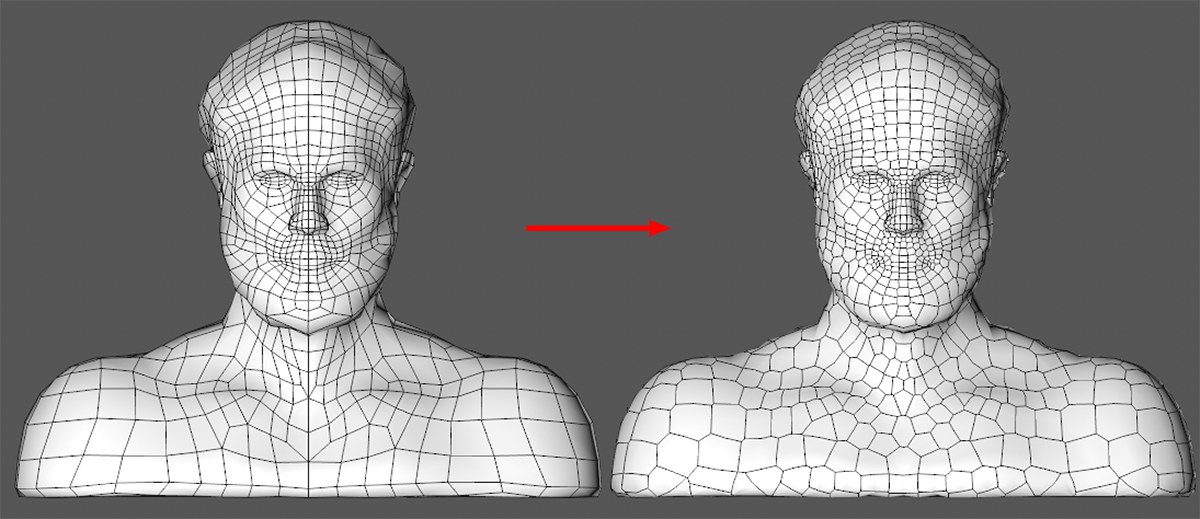
Enable the Hull Only option (Object tab), only let one copy of the object to be fractured exercise its effect in the Source list (Source tab) and then make the Voronoi Fracture object editable (c key). Select all fragments and switch to Use Polygon mode. Now select all polygons and call up the Melt command (main menu: Mesh / Remove). In the Object Manager, make sure that all fragments are still selected and call up the Connect Objects+Delete option (Tag menu). Return to Use Polygon mode and call up the Optimize command (main menu: Mesh / Remove) and you're done.
The following settings are available for the Surface and Volume Creation Methods:
Points lying on the surface can be moved parallel to the polygon Normals. Negative values can also be used, which will move the points beneath the surface.
Splines
When working with splines, the distribution of points can be defined using the following settings:
Points will be created as follows:
- Even: At a uniform distance apart
- Step: Dependent on the spline's Intermediate Points setting
- Count: At random locations
- Vertices: On the spline's base points
Common Parameters
The total number of points that should be created on the object surface or within the volume or spline.
Use this setting to modify the ransom point distribution (see also Seed Values).
If this option is enabled, the following applies: Point distribution made dependent on the position of other objects will remain constant when the Voronoi Fracture object is moved. In other words, the points will move with the Voronoi Fracture object and the fragments will remain unchanged. The points will be colored blue.
If this option is disabled, the fragmentation will change because the object to be fragmented will push itself through stationary Voronoi cells and be fragmented correspondingly.
Enabling this option is recommended if you are satisfied with the fragmentation and the Voronoi Fracture object can be used at a different location for the subsequent workflow.
Thinking Particles
The following option is available if a particle group is placed into the list:
Particles or particle groups will be treated as points.