
XPresso Pool

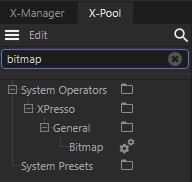
The XPresso Pool provides a quick way to add nodes to the XPresso Editor. The XPresso Pool contains all of the CINEMA 4D nodes, to which you can add your own pools, where each node is configured to suit your needs. For example, suppose you often need to create a Math node for integer subtraction (Data Type set to Integer and Function set to Subtract). Rather than change these parameters manually each time you need to create such a node, you can add the configured node to the XPressoPool. The next time you need the node, you can drag it from the pool and drop it into the XPresso Editor, already set up for integer subtraction.
To open the XPresso Pool:
- The XPresso Pool is integrated into the XPresso Editor by default. However, should you undock and close the pool, you can reopen it by choosing Custom / XPresso Pool in the XPresso Editor.
To create a node:
- Drag & drop the node that you want to create from the XPresso Pool into the XPresso Editor.
To open and close hierarchies:
- Click the icon to the left of an element's name.
To create your own pool of nodes:
- In the XPresso Pool, create a new pool by choosing Edit / Create Pool. (You cannot add your own nodes to the original pool.)
- Configure the nodes that you want to add to the pool.
- Drag the nodes that you want to add to the pool from the XPresso Editor and drop them into the new XPresso pool..
Edit Menu
Choose this command to create a new pool for your own node configurations. Use the dialog that opens to define a save path for the pool (note that groups are saved to the Library / xnode folder within the Preferences Folder); the pool is saved automatically and will be made available each time you restart CINEMA 4D. To add your own node configurations to the pool, first configure the nodes as desired in the XPresso Editor then Drag & drop the nodes into the pool
This command allows you to load a pool file.
Removes the selected preset or folder from the pool.
Renames the preset. For example, if you have configured a Math node for integer subtraction, you may want to rename it to Subtract Int.
Creates a new folder. This enables you to arrange your own pool into folders for better organization. Drag & drop the nodes that you want to place within the folder from the XPresso Pool or XPresso Editor into the folder.