
Animation
If you want to export animations that were made in the Timeline using position, size and angle tracks, activate this option.
Please note that if you want to export key interpolations of type Step, all X, Y and Z keys must be of this type, otherwise they will be interpolated as Spline (this also applies to the PoseMorph keys).
This option is for exporting morph animations. These are shape animations that are realized using pose morph or PLA.
The following applies to pose morphs: Only pose morphs of the type Points are supported:
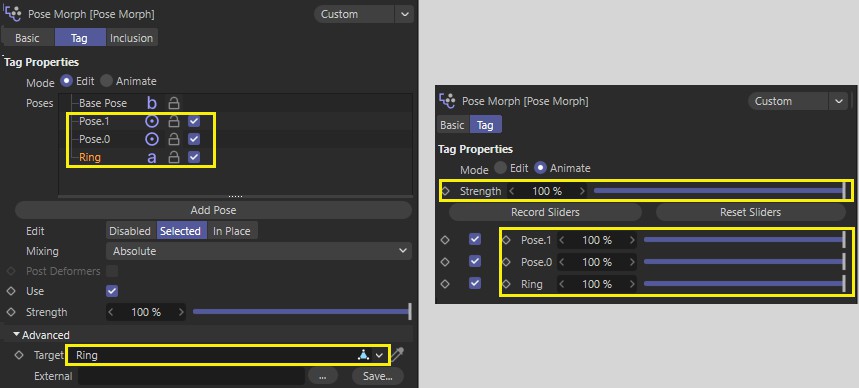 Elements supported by the export are highlighted in yellow (incl. animations of the strength sliders on the right hand side).
This is used to export animations based on PGW joint animations, e.g., character animations.
Please note that glTF can process a maximum of 4 joint weightings per point. If there are more in the Cinema 4D scene, only the 4 strongest weightings are taken into account.
Please also note that the joint hierarchy is not a Child object of the object to be deformed and that there are only joints in the joint list in the corresponding Weighting tag.
The following also applies: glTF does not support non-normalized points or points with zero weighting. If you need non-deforming points, weight them in a root joint (also called dummy joint) before exporting to glTF.
Object movements in a scene, e.g., due to dynamics or expressions (e.g., Vibrate tag), which do not have PGW tracks in the Timeline, can be baked if this option is activated so that these movements can also be exported. Tracks and keys will be generated internally for each frame.
You should generally bake animations even if they look different than in Cinema 4D.